 All-in-One Messenger Hub
Export Your WhatsApp Contacts and Groups
Back up your contacts or move them into your CRM in a few clicks.
All-in-One Messenger Hub lets you export your WhatsApp contacts and group members to Excel, CSV or JSON. Search and filter first, then export exactly the list you need - perfect for backups, migrations and CRM imports.
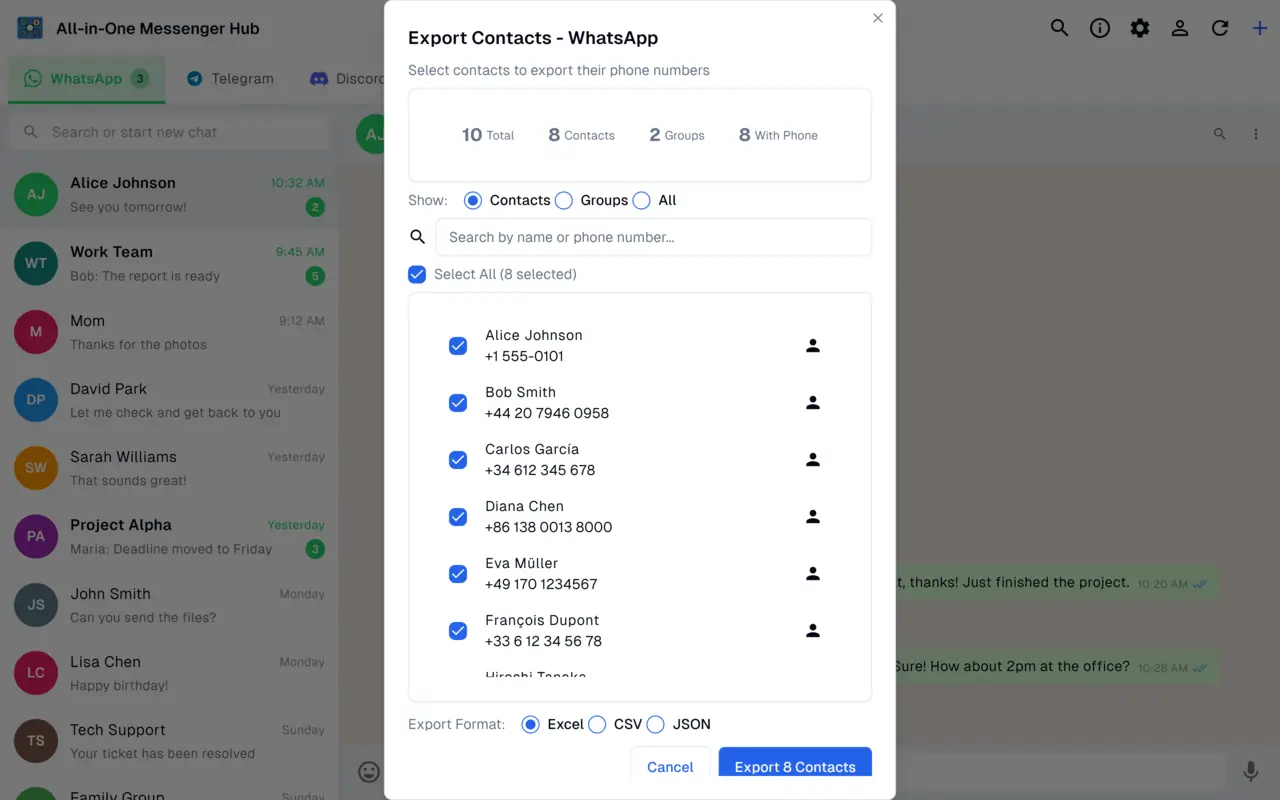
Excel, CSV or JSON
Choose the format that fits your workflow, from spreadsheets to data imports.
Contacts and Groups
Export individual contacts or the members of your WhatsApp groups.
Search and Filter
Find exactly the contacts you want before exporting.
Backups and CRM
Keep a safe copy of your contacts or load them into your CRM.
How Contact Export Works
Open the export tool
Go to the contact export screen for your WhatsApp account.
Search and select
Filter your contacts and groups and choose what to export.
Export and save
Download your list as Excel, CSV or JSON.
Back Up Your WhatsApp Contacts
Download All-in-One Messenger Hub for Windows and export your contacts.