 All-in-One Messenger Hub
AI-Powered Chatbot Automation
Let intelligent bots handle your repetitive messages automatically
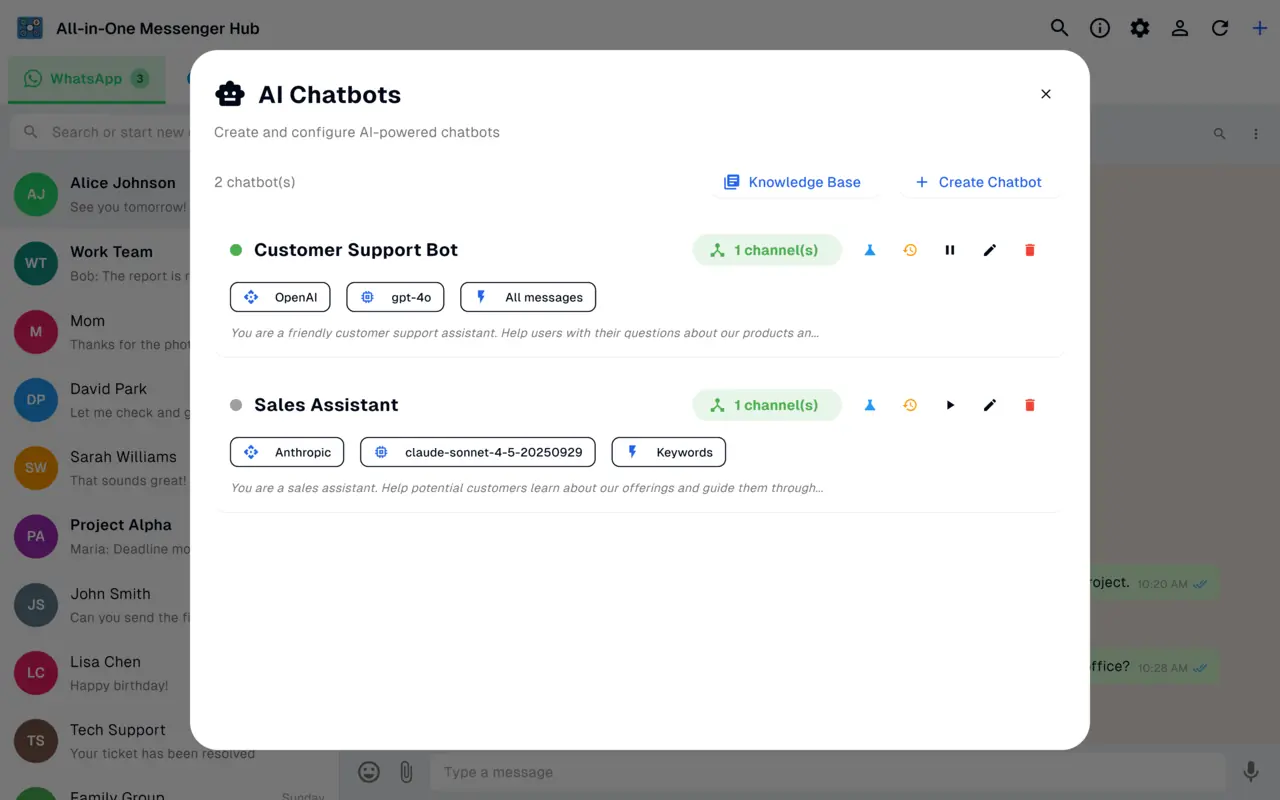
Create smart chatbots that automatically reply to incoming WhatsApp, Facebook and Instagram messages, using AI models from OpenAI, Anthropic Claude, OpenRouter, or a custom provider.
Why Use AI Chatbots?
Save Time
Automatically respond to common questions and messages 24/7 without manual intervention
Scale Your Communication
Handle thousands of conversations simultaneously without additional team members
Consistent Responses
Ensure all customers receive consistent, high-quality responses based on your rules
Improve Response Time
Respond instantly to messages, improving customer satisfaction and engagement
Multiple AI Providers
Choose the best AI model for your needs
OpenAI
GPT-4o, GPT-4, GPT-3.5
Connect directly for Messenger and Instagram bots
Anthropic Claude
Claude 3.5 Sonnet, Opus
Connect directly for Messenger and Instagram bots
OpenRouter
Access to 100+ models
One key, every channel, including WhatsApp
Custom Provider
Any OpenAI-compatible API
Self-hosted or enterprise models for Messenger and Instagram
Advanced System Prompt Customization
Define your chatbot's personality and behavior
Customize exactly how your chatbot responds with detailed system prompts. Use dynamic variables to personalize responses:
{name}
Contact's name for personalized greetings
{message}
Current incoming message
{current_time}
Current date and time for context-aware responses
{last_messages}
Full conversation history for context
{last_messages(N)}
Last N messages from the conversation
Knowledge Base System
Reusable content blocks for consistent responses
Create a library of frequently used responses that your chatbot can reference. Perfect for FAQs, product information, policies, and common questions.
Intelligent Trigger System
Control when your chatbot responds
Set up smart rules to determine exactly when your chatbot should activate and respond.
All Messages
Respond to every incoming message (with cooldown protection)
Keyword Triggers
Respond only to specific keywords or phrases (e.g., 'help', 'support', 'pricing')
Phone Number Filter
Whitelist specific numbers for testing before full deployment
Chat Label Filter
Target or exclude chats with specific labels for precise control
Advanced Response Control
Fine-tune bot behavior for natural conversations
Response Delay
Add 0-60+ seconds delay to make responses feel natural and avoid suspicion
Message Debounce
Wait for the user to finish typing before responding (prevent interruptions)
Length Truncation
Automatically fit responses to platform character limits
Multi-Bot Support
Multiple bots can respond to the same message with different roles
Cooldown Timer
Prevent spam by setting time between responses to same user
Comprehensive Activity Logging
Track every action your chatbot takes
Events Tracked
- • Messages received and processed
- • Messages filtered out (with reasons)
- • AI requests sent and responses received
- • Errors and exceptions
- • Manual test operations
Log Features
- • Real-time and historical log viewing
- • Summary and detailed modes
- • Copy logs to clipboard
- • Clear logs when needed
- • File size tracking
Real-World Use Cases
Customer Support Automation
Instantly respond to common support questions with accurate, consistent answers from your knowledge base
Lead Qualification
Automatically qualify leads and gather information before passing to sales team
FAQ Automation
Answer frequently asked questions instantly without human intervention
Appointment Scheduling
Use AI to handle appointment requests and confirmation messages automatically
Product Information
Provide instant product details and pricing information to interested customers
Order Status Updates
Send automated order status updates and tracking information to customers
Getting Started - Best Practices
Start Simple
Begin with keyword triggers for common questions before expanding to all-message responses
Test with Whitelist
Use phone number whitelisting to test your chatbot with friends before going live
Add Response Delay
Include 3-5 second delays to make responses feel natural and not robotic
Use Knowledge Base
Create a knowledge base for consistent, up-to-date information across conversations
Monitor Logs
Regularly check activity logs to understand how users interact with your bot
Iterate and Improve
Use logs and feedback to continuously improve your system prompts and responses
Ready to Automate Your Messaging?
Create your first AI chatbot today