 All-in-One Messenger Hub
Run Multiple WhatsApp Accounts on One PC
Use two or more WhatsApp accounts side by side on Windows - each in its own isolated session - plus powerful automation tools.
Keep your personal and work WhatsApp separate, export contacts, and let an AI chatbot auto-reply for you - all inside All-in-One Messenger Hub.
Run Multiple WhatsApp Accounts Side by Side
Two, three or more WhatsApp accounts on one PC
Add as many WhatsApp accounts as you need and switch between them in seconds. Each account runs in its own isolated session, so your personal and work numbers stay completely separate. Running more than one account per platform is a Pro feature.
Why WhatsApp Features Matter
WhatsApp deserves special attention
WhatsApp is the most popular messaging platform worldwide. We've built specialized features specifically for WhatsApp users who need more power and control.
Time Savings
Automate common tasks and responses to save hours each week
Better Organization
Export and manage contacts, use labels, and organize conversations
Scalability
Handle more conversations without adding team members
Professional Automation
Create professional, consistent customer experiences at scale
Advanced Contact Export
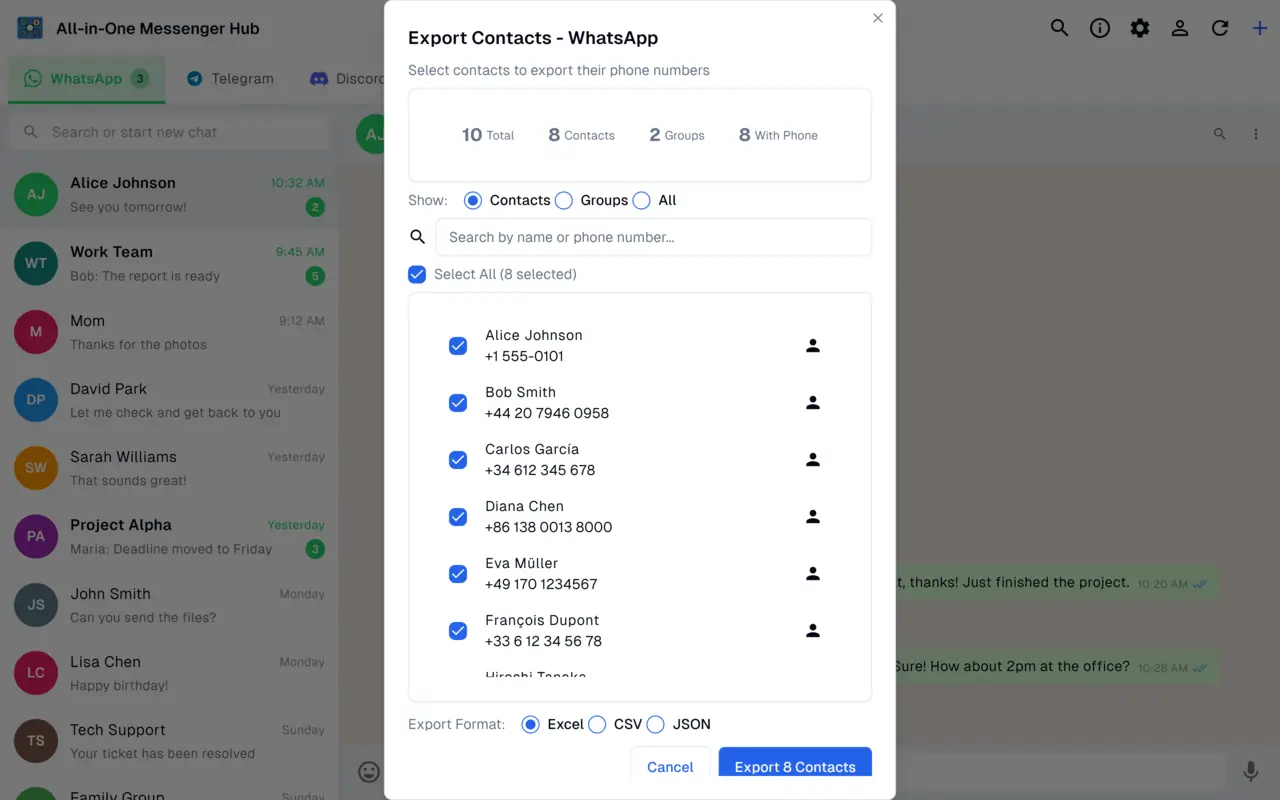
Export WhatsApp contacts to use anywhere
Multiple Format Support
Export to Excel (.xlsx), CSV, or JSON formats based on your needs
Smart Filtering
Choose to export only contacts, only groups, or both
Phone Number Filtering
Include or exclude contacts based on whether they have phone numbers
Search & Select
Search for specific contacts and export only what you need
Bulk Operations
Select all contacts with one click for batch export
One-Click File Opening
Easily open and view exported files directly from the app
AI-Powered Auto-Response
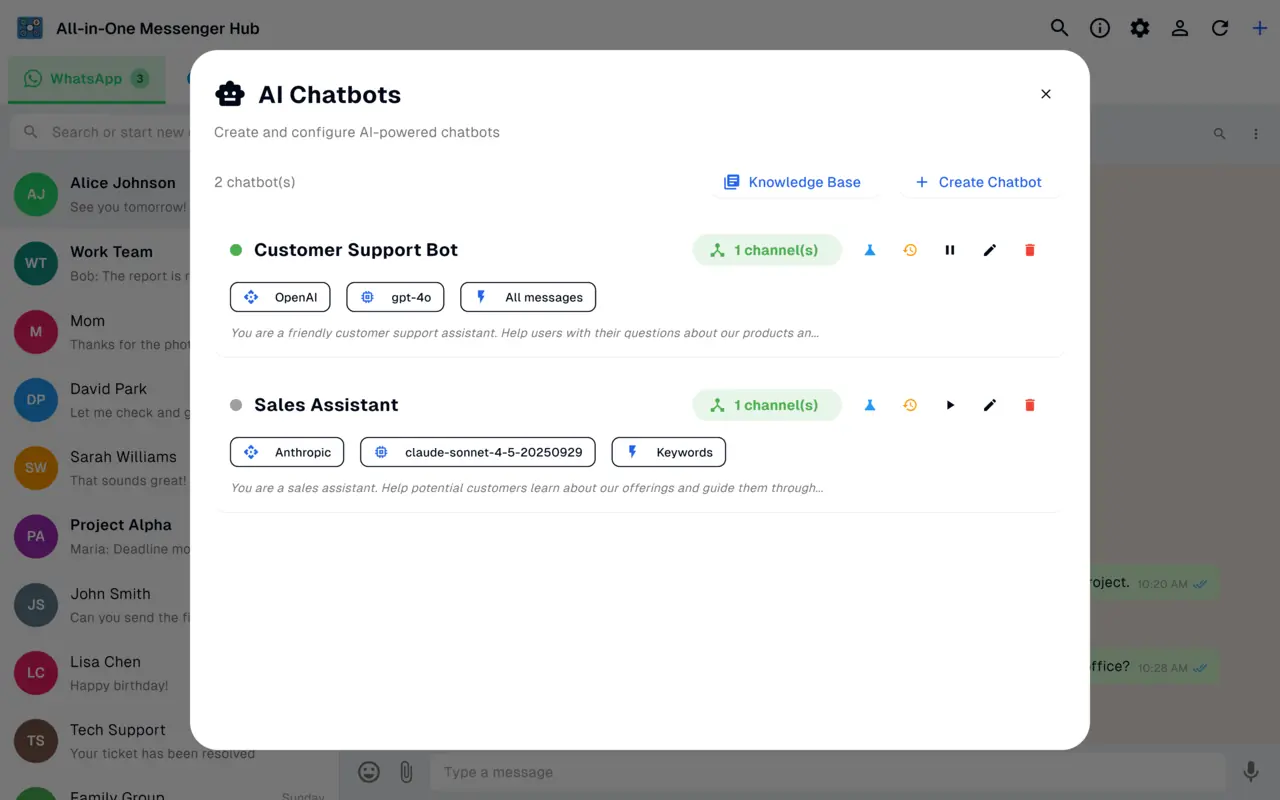
Automatically respond to incoming WhatsApp messages
Intelligent Responses
AI-generated responses that sound natural and helpful
Smart Triggers
Respond based on keywords, phone numbers, or chat labels
Message Debouncing
Wait for users to finish typing before responding
Natural Delays
Add delay to responses for natural-feeling conversations
Activity Logging
See exactly what your bot is responding to and how
Multi-Bot Support
Multiple bots can handle different types of messages
WhatsApp Session API
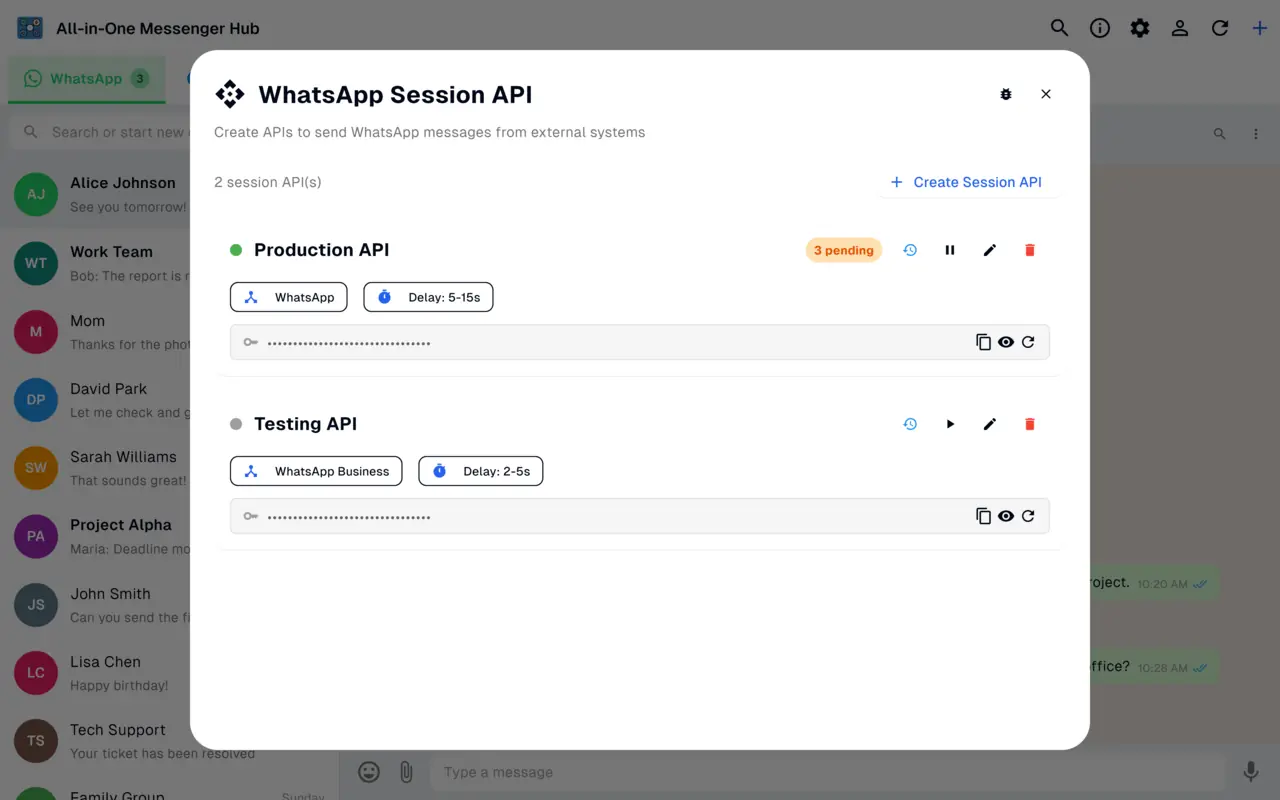
Connect your own apps and workflows to WhatsApp through a secure, session-based API.
- ✓ Generate, hide and regenerate a private API key per account
- ✓ Send messages from your own apps and scripts
- ✓ Configurable delays between messages
- ✓ Monitor pending messages and run multiple Session APIs
Advanced Platform Handler
Deep WhatsApp integration
Message Extraction
Extract and parse WhatsApp messages with full metadata
Contact Management
Access complete contact and group information
Chat Labels
Organize conversations using WhatsApp's label system
Group Features
Manage group chats with special handling for group dynamics
Session Management
Stable, persistent sessions that don't disconnect
Error Recovery
Automatic reconnection and recovery from failures
Real-World Automation Scenarios
Customer Support
Instantly respond to support inquiries with helpful information from your knowledge base
Sales Qualification
Auto-respond to inquiries, qualify leads, and schedule sales conversations
Order Updates
Send automatic order confirmation, tracking, and delivery updates
Appointment Reminders
Automatically send appointment reminders and confirmation messages
FAQ Responses
Instantly answer common questions from your knowledge base
Availability Messages
Auto-respond when you're offline with expected response time
Lead Nurturing
Automatically nurture leads with relevant information over time
Event Notifications
Send updates about events, promotions, or new products automatically
Smart Chat Labels
Organize and target conversations
Phone Number Filtering
Test safely before going live
Getting Started with WhatsApp Features
Create a WhatsApp Account
Add your WhatsApp account to All-in-One Messenger Hub
Set Up a Chatbot
Create an AI chatbot with your preferred AI provider
Configure Triggers
Set up triggers for keywords, numbers, or labels you want to respond to
Test with Whitelist
Add your phone number to the whitelist and test responses
Go Live
Enable automation for all contacts or specific segments
Monitor & Optimize
Check activity logs and refine your bot's responses
Best Practices for WhatsApp Automation
Be Transparent
Let users know they're talking to a bot, especially in customer-facing scenarios
Provide Human Fallback
Always have a way for users to reach a human agent
Use Natural Delays
Add 2-5 second delays to responses for natural conversation flow
Manage Expectations
Be clear about bot limitations and what it can/cannot do
Test Thoroughly
Use phone number whitelisting to test before full deployment
Monitor Performance
Regularly review logs to understand how people interact with your bot
Update Knowledge Base
Keep your knowledge base current with latest information
Respect Privacy
Ensure your bot handles customer data responsibly and securely
Export Your Data
Work with your WhatsApp data anywhere
Export contacts in the format you need for integration with other tools.
Excel (.xlsx)
For use in spreadsheets and data analysis tools like Google Sheets
CSV
Universal format compatible with almost any application
JSON
For developers integrating with custom applications
Frequently Asked Questions
Yes. You can add two or more WhatsApp accounts and use them side by side, each signed in independently in its own isolated session. Multiple accounts per platform is a Pro feature.
Install the app, add a WhatsApp account and scan the QR code, then add another WhatsApp account from the same window. Each account keeps its own session.
Yes. You can export WhatsApp contacts and groups to CSV, JSON or Excel. Contact export is a Pro feature.
Yes. You can connect an AI chatbot (OpenAI, Claude, OpenRouter or a custom provider) to auto-reply to incoming WhatsApp messages, with keyword, phone-number and label triggers.
The app is free with one WhatsApp account. Running multiple WhatsApp accounts, contact export and AI auto-replies are unlocked with a one-time Pro purchase.
Ready to Supercharge Your WhatsApp?
Download All-in-One Messenger Hub and unlock these advanced features